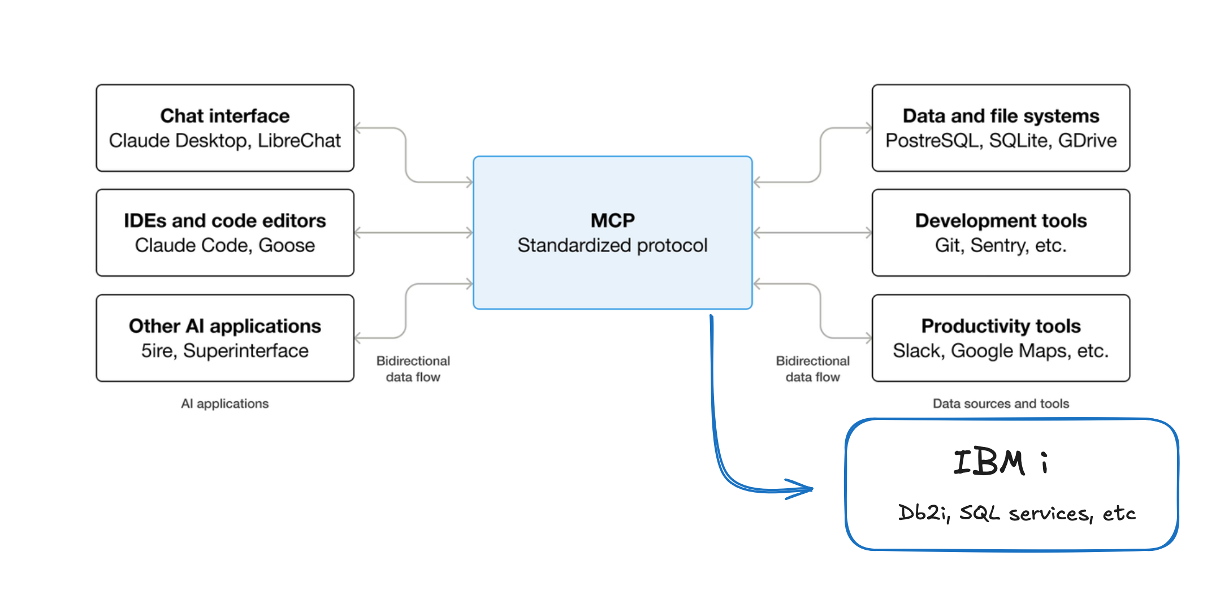
What is This?
The IBM i MCP Server transforms your IBM i SQL expertise into AI-accessible tools:- SQL → AI Tools: Write SQL in YAML files, get AI-ready tools automatically
- Zero Code: No TypeScript, no REST APIs—just SQL you already know
- Secure by Default: IBM i authorities, parameter binding, audit trails built-in
- Universal Protocol: Works with 10+ AI clients (Claude Desktop, VSCode, Cursor, etc.)
Quick Start Path
Understand MCP (5 minutes)
New to the Model Context Protocol? Read What is MCP? to understand how AI agents connect to IBM i.Already familiar? Skip to Step 2.
Install Mapepire
Install Mapepire on your IBM i system—the database connectivity layer required for MCP.Already installed? Verify it’s running and note the port (default: 8076).
Quick Start (15 minutes)
Follow the Quick Start Guide to install the server, configure your connection, and execute your first tool.Result: A working MCP server connected to your IBM i system.
Connect a Client
Choose an AI client and connect it to your server:
- Claude Desktop - Most popular, easiest setup
- VSCode - For development workflows
- Claude Code - CLI and automation
- See all 10+ clients
Choose Your Path
Different goals? Jump directly to what you need:🚀 I'm New Here
Start from scratchInstall the server, connect to IBM i, and execute your first tool in 30 minutes.→ Quick Start Guide
🔧 Build SQL Tools
Make data AI-accessibleAlready have the server running? Learn to create custom SQL tools using YAML.→ SQL Tools Guide
🤖 Build AI Agents
Create specialized agentsBuild intelligent IBM i agents that understand system monitoring, security, and more.→ Agent Development
Core Features
Zero-Code SQL Tools
Create database operations in minutesDefine tools using simple YAML—no TypeScript or programming required. Built-in parameter validation, SQL injection prevention, and result formatting.Learn SQL Tools →
Enterprise Security
IBM i security integrationRespects user profiles, object authorities, and audit requirements. Multiple auth modes including IBM i HTTP authentication with RSA encryption.See Configuration →
Multiple AI Clients
Works with your toolsConnect Claude Desktop, VSCode, Cursor, Gemini CLI, Cline, and more. Supports both stdio (development) and HTTP (production) transports.View Clients →
Production Ready
Built for enterprise IBM iOpenTelemetry observability, structured logging, connection pooling, error handling, and comprehensive audit trails.Review Architecture →
Key Concepts
What is the Model Context Protocol (MCP)?
What is the Model Context Protocol (MCP)?
MCP is an open standard that enables AI agents to securely access and interact with your data through a universal interface. Instead of building custom integrations for each AI tool, MCP provides a standardized way for any MCP-compatible agent to access your IBM i systems.Key Benefits:
- 🔒 Secure, controlled access to enterprise data
- 🔌 Universal protocol understood by all MCP clients
- 🛡️ Preserves IBM i security and audit requirements
- ⚡ Real-time data access without ETL or data exports
Why SQL as MCP Tools?
Why SQL as MCP Tools?
The IBM i MCP Server’s core innovation is transforming SQL queries into MCP tools that AI agents can discover and use. This approach is ideal for IBM i because:
- Zero Code Required: Define tools in YAML files
- IBM i Native: Direct access to DB2, QSYS2 services, stored procedures
- Security Built-In: Parameter binding prevents SQL injection automatically
- Rapid Development: Create new tools in minutes
How does authentication work?
How does authentication work?
The server supports multiple authentication modes to fit your deployment:For Development:
- Shared credentials (stdio): All operations use same Db2i user
- Fast setup for testing and local development
- Per-user authentication (HTTP): Each user connects with their own credentials
- IBM i HTTP Auth: RSA-encrypted credential exchange
- JWT/OAuth: Custom authentication systems
What can I build with this?
What can I build with this?
The server enables AI agents to perform any database operation you configure:Common Use Cases:
- 📊 System monitoring and performance analysis
- 🔍 Business data queries and reporting
- 🔐 Security audits and compliance checks
- 📦 Inventory and resource management
- 🧪 Development and debugging tools
- Performance monitoring agent tracking CPU, memory, jobs
- Discovery agent analyzing schemas and dependencies
- Business intelligence agent answering data questions
- System administration agent managing resources
Common Questions
Will this work with my IBM i version?
Will this work with my IBM i version?
The server works with any IBM i version that supports:
- DB2 for i (Db2 for IBM i)
- QSYS2 system services
- Mapepire server for WebSocket connectivity
Do I need to know TypeScript?
Do I need to know TypeScript?
No! The SQL Tools system uses simple YAML configuration files. You only need SQL knowledge to create database operations.TypeScript is only required if you want to create custom tool types beyond SQL operations.
How is this different from REST APIs?
How is this different from REST APIs?
MCP Advantages:
- AI agents discover tools automatically (no hardcoded endpoints)
- Built-in validation and security patterns
- Universal protocol works with any MCP client
- Structured responses optimized for AI consumption
- Custom integration code for each AI tool
- Manual endpoint documentation
- Custom authentication per client
- Response parsing and adaptation
Can I use this in production?
Can I use this in production?
Yes! The server includes production-ready features:
- OpenTelemetry observability
- Comprehensive audit logging
- Connection pooling
- Error handling and categorization
- Rate limiting and resource protection
- Multi-environment configuration
Where do I get help?
Where do I get help?
Resources:
- 📖 Documentation: You’re reading it!
- 💬 GitHub Issues: Report bugs or request features
- 🔧 Configuration: See environment variables
- 🚀 Examples: Review SQL tools and agents
Ready to Start?
Quick Start Guide
15-minute setupInstall, configure, and execute your first tool
SQL Tools Tutorial
Build custom toolsTransform SQL into AI-accessible operations
More Resources
- What is MCP? - Understand the protocol
- Configuration Reference - All environment variables
- Client Integrations - Connect your AI client
- Agent Development - Build specialized agents
About This Project: The IBM i MCP Server is an open-source project that brings modern AI agent capabilities to IBM i environments while maintaining enterprise security and operational standards. Contributions and feedback are welcome on GitHub.