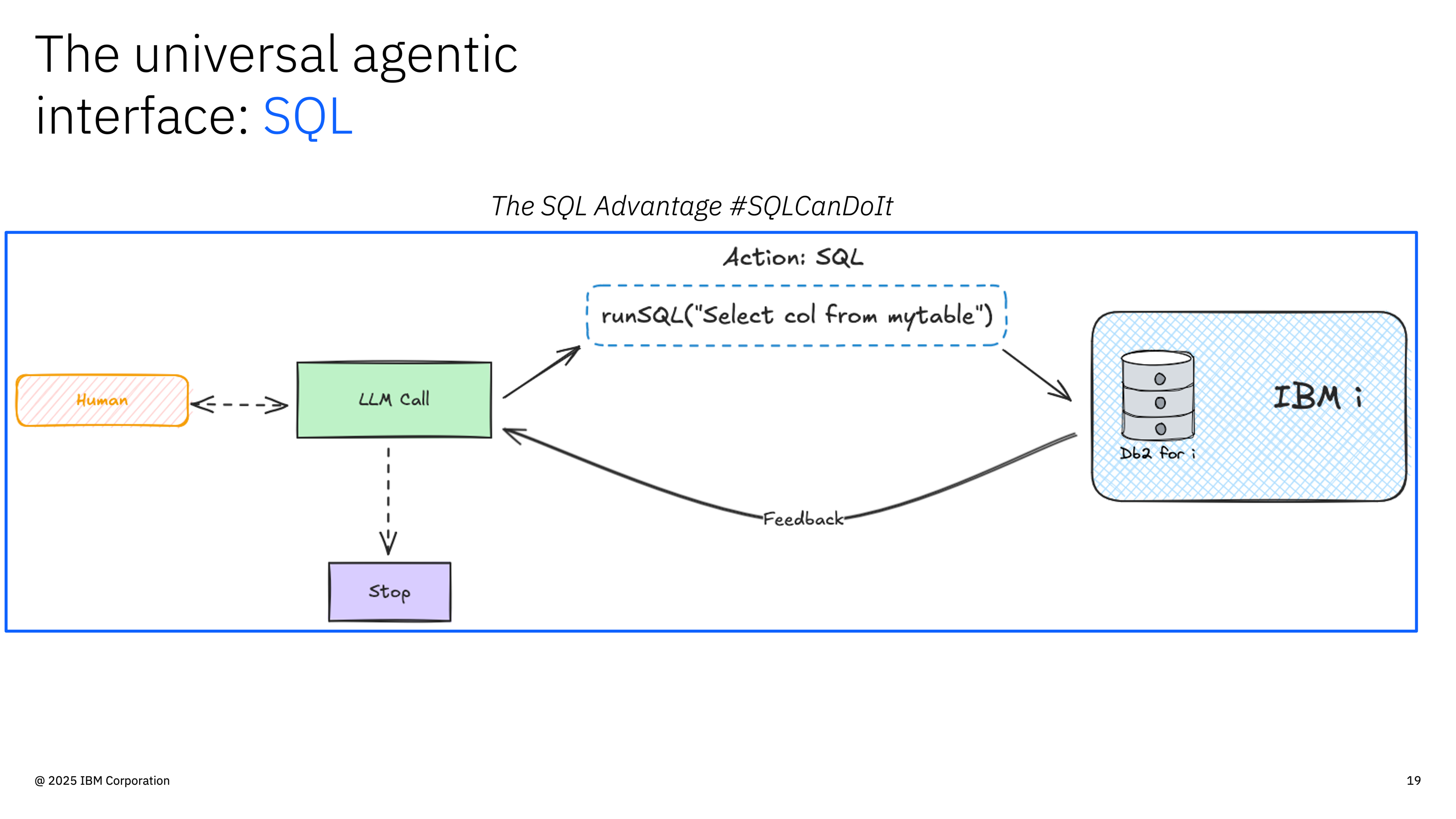
Core Innovation: IBM i already has powerful SQL services (QSYS2, Db2 for i, stored procedures). The MCP server doesn’t replace these—it makes them accessible to AI agents through a standardized protocol. No new infrastructure, no data duplication, just a bridge between AI and your existing IBM i capabilities.
- ✅ Zero New Infrastructure: Uses IBM i’s existing SQL interface—no middleware, no ETL
- ✅ Standardized Protocol: MCP is universal—works with Claude, VSCode, Cursor, and 10+ AI clients
- ✅ IBM i Native: Leverages QSYS2 services, Db2 optimization, and existing security model
- ✅ Data Stays Put: AI queries run against live data—no copies, no sync, no staleness
The Architecture in One Picture
What's New
MCP Server (middle layer) and YAML tool definitionsThis is the only new infrastructure you deploy
What's Reused
Everything else: SQL interface, Db2, QSYS2, security, stored proceduresAll your existing IBM i capabilities
What is an MCP Server?
An MCP (Model Context Protocol) server is a standardized interface that connects AI agents to external systems. Instead of building custom integrations for each AI platform, MCP provides a universal protocol that works across Claude, VSCode, Cursor, and other AI tools. The MCP server handles four responsibilities:- Tool Registration - Advertises available operations to AI agents
- Request Validation - Ensures parameters are correct and safe
- Execution - Runs operations against your systems
- Response Formatting - Returns structured results AI agents understand
SQL as MCP Tools: Exposing IBM i’s Existing Capabilities
The key insight: IBM i already has everything AI agents need—DB2 for i, QSYS2 system services, performance views, security tables. The MCP server simply makes these existing SQL interfaces accessible to AI through standardized tool definitions.Why SQL is Perfect for IBM i AI Tools
IBM i’s SQL interface is uniquely powerful because it provides:QSYS2 System Services
Already on your system: 500+ views and functions for monitoring jobs, performance, security, and system health—no installation required
Db2 for i Optimization
Production-ready performance: Query optimizer, connection pooling, result caching all work out of the box
Native Security Model
Built-in authority checking: Object-level permissions, special authorities, and audit trails just work
Stored Procedures
Existing business logic: Call RPG, COBOL, or CL programs through SQL—no rewrites needed
Example: Exposing QSYS2 Services to AI
Let’s see how an existing IBM i service becomes an AI tool. No new infrastructure—just a YAML definition that exposes what’s already there. Step 1: The SQL Service (Already Exists on IBM i)What just happened: You exposed an existing IBM i service (QSYS2.ACTIVE_JOB_INFO) to AI agents using a simple YAML file. The SQL service was already there, already secured, already optimized. The MCP server just made it discoverable and callable through a standardized protocol.
How Requests Flow Through the Server
Understanding the request flow helps explain how SQL tools maintain security while providing flexibility:Step-by-Step Flow
1
Tool Request
AI agent identifies a need (e.g., “show me active jobs”) and calls the
get_active_jobs tool2
Parameter Validation
Server validates all parameters against defined constraints (type, range, pattern, etc.)
3
SQL Security
Parameters are safely bound to SQL using prepared statements—SQL injection is impossible
4
Database Execution
SQL executes against Db2 for i using authenticated user’s authorities
5
Result Formatting
Results formatted as markdown tables and structured JSON for AI consumption
Parameter Binding Security: Parameter binding is the key security feature. Instead of concatenating user input into SQL strings (dangerous), parameters are bound separately by the database driver. The SQL structure cannot be modified, preventing injection attacks entirely.
Server Components
The server is organized into clear functional areas:1. Tool Registry
What it does: Manages all available tools and their schemas Two types of tools:- SQL Tools (YAML-defined) - IBM i database operations
- TypeScript Tools (code-based) - Custom logic and external integrations
2. YAML Tool Engine
What it does: Converts YAML configurations into executable SQL tools Process:- Load YAML files from configured directories
- Parse tool definitions and parameter schemas
- Generate validation logic from parameter constraints
- Register tools with the MCP server
- Execute SQL safely when tools are called
3. Connection Management
What it does: Maintains secure, efficient database connections Features:- Connection pooling for performance
- Automatic reconnection on failures
- Per-user connection isolation (HTTP auth mode)
- Credential encryption (IBM i auth)
- Per-User Connection (HTTP)
4. Transport Layer
What it does: Handles communication between AI agents and the server Two transport modes:
STDIO is simpler (direct process communication), while HTTP enables remote access, load balancing, and web integration.
Next Steps
Build SQL Tools
Create your first YAML SQL tool in minutes
Complete Example
Study the comprehensive employee-info.yaml example
Client Integration
Connect Claude, VSCode, or other MCP clients
Configuration
Review all available environment variables
Architecture Philosophy: Leverage what exists. IBM i’s SQL interface, QSYS2 services, and Db2 optimization are production-proven. Rather than building new infrastructure, this server exposes these existing capabilities to AI agents through a standardized protocol. You write YAML definitions for SQL you already know—the server handles discovery, validation, and formatting for AI consumption.